Notes to self, 2012
2012-12-12 - canon / mf8350 / driver hell
Building Canon MF8350Cdn (and other) CUPS drivers for Linux Debian and/or Ubuntu on amd64 is still a pain in the behind.
Problems encountered during the installation, include:
- Regular make installed stuff in different places but forgot many parts.
Solution: usedpkg-buildpackage - The
libtoolcopied wasn't able to build for shared libs.
Solution: remove--enable-shared/--disable-sharedcommand line options. amd64had to be added to the architecture targets.- A shell script had to lose a bashism.
The right steps
- Download and extract:
Linux_UFRII_PrinterDriver_V250_us_EN.tar.gz(download) - Change dir into:
Linux_UFRII_PrinterDriver_V250_us_EN/Sources - Extract the two tar balls found there:
cndrvcups-common-2.50-1.tar.gz
cndrvcups-lb-2.50-1.tar.gz - Patch both with this patch:
canon_mf8350-wjd.patch (view) - Go into both directories and run:
dpkg-buildpackage
(* See Update below!) - There should now be 4 deb packages in the
Sourcesdir:
cndrvcups-common_2.50-1_amd64.deb(download)
cndrvcups-lipslx_2.50-1_amd64.deb(download)
cndrvcups-ufr2-uk_2.50-1_amd64.deb(download)
cndrvcups-ufr2-us_2.50-1_amd64.deb(download) - Install all, except one of the UK or US versions.
- Manually run
ldconfig
Finally, when installing the printer, you'll have to decide which driver you want. I chose the “Canon MF8300C Series UFRII LT ver.2.5 (color, 2-sided printing)” driver because it is the closest match to our “MF8350Cdn”.
This took way too much time — like some things do.
Useful debug information was obtained using the LogLevel debug option in /etc/cups/cupsd.conf.
Observe that these packages require the ia32-libs (* See Update below!) to be installed.
The reason for that is that not everything in Sources is in source form :-(
Update 2013-03-31
Glen Whitney of the National Museum of Mathematics points out that he had to “install the cndrvcups-common produced by [this] procedure before [he] could compile the cndrvcups-lb stuff.” Thanks for the feedback!
Update 2013-08-19
Installing all of the ia32-libs can be a bit much. In fact, you only
need these: libc6:i386 libp11-kit0 libxml2:i386 zlib1g:i386
Update 2013-09-18
Is buftool.h missing? Look more closely at Update 2013-03-31.
2012-10-25 - easy / certificate generation / testing
If I'm going to be requesting SSL certificates more often, I'd better automate the process a bit.
The result:
easycert.sh (view)
Possible invocation styles:
$ easycert.sh -h
Usage: easycert.sh -c NL -l Groningen -o OSSO\ B.V. -e info@osso.nl osso.nl
Usage: easycert.sh osso.nl "/C=NL/L=Groningen/O=OSSO B.V./CN=osso.nl/"
Usage: easycert.sh -T www.osso.nl 443
Generating a key and certificate:
$ easycert.sh -o "My Company" mycompany.com
Subject: /C=NL/L=Groningen/O=My Company/CN=mycompany.com/emailAddress=info@osso.nl
Enter to proceed...
Generating RSA private key, 4096 bit long modulus
..................................................................................................................................................++
..................++
e is 65537 (0x10001)
mycompany_com-2012.csr
The same, but in a non-interactive fashion:
$ easycert.sh mycompany.com "/C=NL/L=Groningen/O=My Company/CN=mycompany.com/emailAddress=info@osso.nl" </dev/null 2>&0
mycompany_com-2012.csr
$ ls -l mycompany_com-2012.*
-rw-r--r-- 1 walter walter 1704 2012-10-25 12:14 mycompany_com-2012.csr
-rw-r--r-- 1 walter walter 3243 2012-10-25 12:14 mycompany_com-2012.key
Testing SSL configuration on the server:
$ easycert.sh mail.osso.nl 993 -T
The list below should be logically ordered,
and end with a self-signed root certificate:

Certificate chain
 0 s:/OU=Domain Control Validated/OU=PositiveSSL Wildcard/CN=*.osso.nl
   i:/C=GB/ST=Greater Manchester/L=Salford/O=Comodo CA Limited/CN=PositiveSSL CA
 1 s:/C=GB/ST=Greater Manchester/L=Salford/O=Comodo CA Limited/CN=PositiveSSL CA
   i:/C=US/ST=UT/L=Salt Lake City/O=The USERTRUST Network/OU=http://www.usertrust.com/CN=UTN-USERFirst-Hardware
 2 s:/C=US/ST=UT/L=Salt Lake City/O=The USERTRUST Network/OU=http://www.usertrust.com/CN=UTN-USERFirst-Hardware
   i:/C=SE/O=AddTrust AB/OU=AddTrust External TTP Network/CN=AddTrust External CA Root
 3 s:/C=SE/O=AddTrust AB/OU=AddTrust External TTP Network/CN=AddTrust External CA Root
   i:/C=SE/O=AddTrust AB/OU=AddTrust External TTP Network/CN=AddTrust External CA Root
---
Now all it needs is a CGI front-end so the customers can generate their own CSRs
while leaving the keys privately on the server. No wait.. I added that already.
Just run the script as a cgi script and you'll get the files in /tmp.
Update 2013-05-28
Sending the last self-signed certificate is generally only unnecessary overhead. In the example above, the third and final certificate in the chain may be skipped.
And see the SSL Labs SSL analyzer for a helpful report about the state of your HTTPS server.
Common Apache2 configs you may need to add:
# Fight BEAST attack
SSLHonorCipherOrder On
SSLCipherSuite ECDHE-RSA-AES128-SHA256:AES128-GCM-SHA256:RC4:HIGH:!MD5:!aNULL:!EDH
Common NginX config:
ssl_protocols        SSLv3 TLSv1 TLSv1.1 TLSv1.2;
ssl_ciphers          ECDHE-RSA-AES256-SHA384:AES256-SHA256:RC4:HIGH:!MD5:!aNULL:!DH:!EDH;
ssl_prefer_server_ciphers on;
2012-08-17 - setuid / seteuid / uid / euid
So, what is the difference between uid and euid
and the setuid and seteuid calls?
Hao Chen, David Wagner and Drew Dean wrote an excellent paper called Setuid Demystified. It explains all the ins and outs. To answer the question, we need only parts of the article.
Let the quoting begin.
Each process has three user IDs: the real user ID (real uid, or ruid), the effective user ID (effective uid, or euid), and the saved user ID (saved uid, or suid). The real uid identifies the owner of the process [i.e. the user launching the application], the effective uid is used in most access control decisions, and the saved uid stores a previous user ID so that it can be restored later.
[... A setuid binary starts with the file-owner in the euid and suid. See the examples below. ...]
Similarly, a process has three group IDs: the real group ID, the effective group ID, and the saved group ID. In most cases, the properties of the group IDs parallel the properties of their user ID counterparts.
[... And, linux has two more for filesystem access: fsuid/fsgid. If not set explicitly, they follow the euid/egid. ...]
As System V and BSD influenced each other, both systems implemented setuid, seteuid, and setreuid, although with different semantics. None of these system calls, however, allowed the direct manipulation of the saved uid (although it could be modified indirectly through setuid and setreuid). Therefore, some modern Unix systems introduced a new call, setresuid, to allow the modification of each of the three user IDs directly.
[...] setresuid has the clearest semantics among the four uid-setting system calls. The permission check for setresuid() is intuitive and common to all OSs: for the setresuid() system call to be allowed, either the euid of the process must be root, or each of the three parameters must be equal to one of the three user IDs of the process.
Requirements:
  (euid == 0)
    ||
  (newruid in (ruid, euid, suid) &&
   neweuid in (ruid, euid, suid) &&
   newsuid in (ruid, euid, suid))
[...] seteuid has also a clear semantics. It sets the effective uid while leaving the real uid and saved uid unchanged.
Requirements on Linux/Solaris:
  (euid == 0)
  ||
  (neweuid in (ruid, euid, suid))
Requirements on FreeBSD: (euid == 0) || (neweuid in (ruid, suid))[...] Although setuid is the only uid-setting system call standardized in POSIX 1003.1-1988, it is also the most confusing one.
Requirements on Linux/Solaris:
  (euid == 0)
  ||
  (newuid in (ruid, suid))
Requirements on FreeBSD: (euid == 0) || (newuid in (ruid, euid, suid))[...] Second, the action of setuid differs not only among different operating systems but also between privileged and unprivileged processes.
Behaviour on Linux/Solaris:
  (euid == 0) ==>
    (ruid:=newuid, euid:=newuid, suid:=newuid)
  (anything else) ==>
    (euid:=newuid)
Behaviour on FreeBSD: (ruid:=newuid, euid:=newuid, suid:=newuid)
Clear? Almost. seteuid seems to make sense, but the
setuid behaviour seems rather awkward.
Maybe some examples on Linux help.
#define _GNU_SOURCE
#include <sys/types.h>
#include <unistd.h>
#include <stdio.h>
#include <errno.h>
#define call(fun) errno = 0; fun; perror(#fun)
int main(int argc, char **argv) {
  uid_t ruid = -1, euid = -1, suid = -1;
  getresuid(&ruid, &euid, &suid);
  printf("> ruid=%d, euid=%d, suid=%d\n", ruid, euid, suid);
  call(setuid(1000));
  getresuid(&ruid, &euid, &suid);
  printf("> ruid=%d, euid=%d, suid=%d\n", ruid, euid, suid);
  return 0;
}
$ gcc example.c ; sudo chown root ./a.out ; sudo chmod 4755 ./a.out
$ ls -ln a.out
-rwsr-xr-x 1 0 1000 8716 2012-08-17 17:01 a.out
$ ./a.out
> ruid=1000, euid=0, suid=0
setuid(1000): Success
> ruid=1000, euid=1000, suid=1000
You were effectively root and you justed dropped those permissions.
You should've used seteuid if you wanted them back.
$ sudo ./a.out
> ruid=0, euid=0, suid=0
setuid(1000): Success
> ruid=1000, euid=1000, suid=1000
Same as before.
Lets throw a third user in the mix.
$ sudo chown nobody ./a.out ; sudo chmod 4755 ./a.out
$ ls -ln a.out
-rwsr-xr-x 1 65534 1000 8716 2012-08-17 17:33 a.out
$ ./a.out
> ruid=1000, euid=65534, suid=65534
setuid(1000): Success
> ruid=1000, euid=1000, suid=65534
We're really just doing seteuid here.
Lastly, the case where the euid isn't 0
and newuid isn't in real, effective or saved:
$ sudo ./a.out
> ruid=0, euid=65534, suid=65534
setuid(1000): Operation not permitted
> ruid=0, euid=65534, suid=65534
Yes, that didn't satisfy the requirements as mentioned above.
But we can seteuid(0) and then
seteuid(1000) to get euid to 1000.
$ sudo ./a.out2
> ruid=0, euid=65534, suid=65534
seteuid(0): Success
seteuid(1000): Success
> ruid=0, euid=1000, suid=65534
Hope this helps ;-)
If you're interested in the source of the awkward behaviour, read the entire article and/or one of their sources which goes into the cause much deeper: Chris Torek's “setuid mess”
That should also explain why there are three uids and not just two.
After all, two should be enough (effective and another one to switch back to),
along with a pointer to the effective one: the early solution to temporarily
drop powers was setreuid, a method by which two uids could be
swapped. However, this swapping was cumbersome and was finally (skipping a few
steps) replaced by setresuid.
2012-07-16 - postfix / submission / smtpd_client_restrictions / sleep
After tweaking my postfix configuration, I apparently broke submission on port 587. Every time I connected, I immediately got:
554 5.7.1 <my.host.name[1.2.3.4]>: Client host rejected: Access denied
That's strange. Postfix is supposed to reject unauthenticated clients only in master.cf:
submission inet  n       -       n       -       -       smtpd
  -o smtpd_tls_security_level=encrypt
  -o smtpd_tls_auth_only=yes
  -o smtpd_client_restrictions=permit_sasl_authenticated,reject
But if it rejects me at connect time, I don't have a chance to identify myself.
The cause of the problem turned out to be this: smtpd_delay_reject = no
To combat spam, I use the sleep parameter. Many bots give up within a short
amount of time after connecting — or they write commands without waiting for
feedback (pipelining) — so waiting a bit helps a lot.
smtpd_client_restrictions
...
       sleep seconds
              Pause for the specified number of seconds and proceed with the next restriction in the list, if any. This may stop zombie mail when used as:
              /etc/postfix/main.cf:
                  smtpd_client_restrictions =
                      sleep 1, reject_unauth_pipelining
                  smtpd_delay_reject = no
(Some people will call this waiting bad. However, no MTA has trouble with a little wait, and this is FAR better than graylisting which ensures that the recipient has to wait entire hours, instead of just seconds, for their mail.)
The smtpd_delay_reject = no causes the sleep to actually get executed
at connect time. If we skip this, we're already half-way through the mail-sending before
any sleep occurs.
For submission/587, I used the default authenticated clients only config:
smtpd_sasl_auth_enable (default: no)
...
       To reject all SMTP connections from unauthenticated clients, specify "smtpd_delay_reject = yes" (which is the default) and use:

           smtpd_client_restrictions = permit_sasl_authenticated, reject
You'll notice the conflicting options.
The fix: replace smtpd_client_restrictions with smtpd_recipient_restrictions.
Now the same is authenticated check is performed, but first after we've had
a chance to identify ourselves.
2012-07-09 - new ipython / old django
IPython after version 0.10 is not friends with older Django (e.g. 1.1.x) versions
anymore.
    shell = IPython.Shell.IPShell(argv=[])
AttributeError: 'module' object has no attribute 'Shell'
This is fixed in newer Django's, but this isn't backported.
Here, a patch. (Nothing more than a diff between the old and the new Django version.)
--- django/core/management/commands/shell.py  2012-03-28 16:10:28.000000000 +0200
+++ django/core/management/commands/shell.py  2012-01-24 10:27:50.405338739 +0100
@@ -8,9 +8,38 @@
             help='Tells Django to use plain Python, not IPython.'),
     )
     help = "Runs a Python interactive interpreter. Tries to use IPython, if it's available."
-
+    shells = ['ipython', 'bpython']
     requires_model_validation = False

+    def ipython(self):
+        try:
+            from IPython.frontend.terminal.embed import TerminalInteractiveShell
+            shell = TerminalInteractiveShell()
+            shell.mainloop()
+        except ImportError:
+            # IPython < 0.11
+            # Explicitly pass an empty list as arguments, because otherwise
+            # IPython would use sys.argv from this script.
+            try:
+                from IPython.Shell import IPShell
+                shell = IPShell(argv=[])
+                shell.mainloop()
+            except ImportError:
+                # IPython not found at all, raise ImportError
+                raise
+
+    def bpython(self):
+        import bpython
+        bpython.embed()
+
+    def run_shell(self):
+        for shell in self.shells:
+            try:
+                return getattr(self, shell)()
+            except ImportError:
+                pass
+        raise ImportError
+
     def handle_noargs(self, **options):
         # XXX: (Temporary) workaround for ticket #1796: force early loading of all
         # models from installed apps.
@@ -23,11 +52,7 @@
             if use_plain:
                 # Don't bother loading IPython, because the user wants plain Python.
                 raise ImportError
-            import IPython
-            # Explicitly pass an empty list as arguments, because otherwise IPython
-            # would use sys.argv from this script.
-            shell = IPython.Shell.IPShell(argv=[])
-            shell.mainloop()
+            self.run_shell()
         except ImportError:
             import code
             # Set up a dictionary to serve as the environment for the shell, so
And another patch to get the classic mode to work here too.
(The TerminalInteractiveShell() would require a config=load_default_config()
from IPython.frontend.terminal.ipapp.)
--- django/core/management/commands/shell.py  2012-07-09 10:30:12.423405004 +0200
+++ django/core/management/commands/shell.py  2012-07-09 10:45:23.391960205 +0200
@@ -13,9 +13,8 @@

     def ipython(self):
         try:
-            from IPython.frontend.terminal.embed import TerminalInteractiveShell
-            shell = TerminalInteractiveShell()
-            shell.mainloop()
+            from IPython import embed
+            embed()
         except ImportError:
             # IPython < 0.11
             # Explicitly pass an empty list as arguments, because otherwise
2012-06-21 - serialize json date / microsoft extension
Bertrand Le Roy describes how Microsoft added a Date object extension to JSON in a compatible fashion to implement serialization and serialization of timezone agnostic datetimes.
Our current approach is using a small loophole in the JSON specs. In a JSON string literal, you may (or may not) escape some characters. Among those characters, weirdly enough, there is the slash character (
'/'). This is weird because there actually is no reason that I can think of why you'd want to do that. We've used it to our benefit to disambiguate a string from a date literal.The new format is
"\/Date(1198908717056)\/"where the number is again the number of milliseconds since January 1st 1970 UTC.
I actually kind of like the hack. So, here is an implementation for Python: jsonext.py (view)
Before:
>>> import datetime, json
>>> encoded = json.dumps(datetime.date.today())
Traceback (most recent call last):
  File "<stdin>", line 1, in <module>
...
  File "/usr/lib/python2.6/json/encoder.py", line 344, in default
    raise TypeError(repr(o) + " is not JSON serializable")
TypeError: datetime.date(2012, 6, 21) is not JSON serializable
After:
>>> import datetime, json, jsonext
>>> encoded = json.dumps(datetime.date.today(), cls=jsonext.ExtendedJSONEncoder)
>>> decoded = json.loads(encoded, cls=jsonext.ExtendedJSONDecoder)
>>> print repr(decoded)
datetime.datetime(2012, 6, 21, 0, 0)
2012-06-14 - gigaset n300a / respect srv
Does the Siemens Gigaset N300A handle SRV records?
Yes it does.. but..
Let's look at a bit of Gigaset DNS traffic:
09:24:26.059850 IP gigaset.local.32978 > nameserver.local.53: 50512+ NAPTR? gigaset.voip.example.com. (28)
09:24:26.061552 IP nameserver.local.53 > gigaset.local.32978: 50512 0/1/0 (87)
09:24:26.063894 IP gigaset.local.32978 > nameserver.local.53: 25738+ SRV? _sip._udp.gigaset.voip.example.com. (38)
09:24:26.064445 IP nameserver.local.53 > gigaset.local.32978: 25738 2/3/2 SRV proxy1.voip.example.com.:5060 10 0, SRV proxy2.voip.example.com.:5060 20 0 (231)
09:24:26.066939 IP gigaset.local.32978 > nameserver.local.53: 22676+ SRV? _sip._tcp.gigaset.voip.example.com. (38)
09:24:26.067290 IP nameserver.local.53 > gigaset.local.32978: 22676 2/3/2 SRV proxy2.voip.example.com.:5060 40 0, SRV proxy1.voip.example.com.:5060 30 0 (231)
09:24:26.070633 IP gigaset.local.32978 > nameserver.local.53: 11475+ A? gigaset.voip.example.com. (28)
09:24:26.070934 IP nameserver.local.53 > gigaset.local.32978: 11475 2/3/0 A 1.2.3.5, A 1.2.3.4 (133)
It's doing an NAPTR query. Ok. I don't have those.
Next, it's looking up the _sip._udp and _sip._tcp SRV records. Good.
Next, it's looking up the A record. Why?
09:24:26.076373 IP gigaset.local.5060 > proxy2.voip.example.com.6060: SIP, length: 495
09:24:26.077905 IP proxy2.voip.example.com.6060 > gigaset.local.5060: SIP, length: 497
09:24:26.099485 IP gigaset.local.5060 > proxy2.voip.example.com.6060: SIP, length: 685
09:24:26.102665 IP proxy2.voip.example.com.6060 > gigaset.local.5060: SIP, length: 473
What? Did it does connect to proxy2? Yes.. the first one it got from the A record.
That's wrong. Why did it look up the SRV records if it wasn't going to use them?
It gets worse. There's an option to have it send NAT keepalives (4 NUL bytes), which works fine. But the keepalive host gets out of sync with the registration server; causing NAT keepalives to be completely useless!
It sends keepalives to proxy1
while registering to proxy2. Now inbound connections from the proxy server
(proxy2) where we register will be rejected by the NAT-router.
The keepalives have been punching the wrong hole
the whole time.
This is a known problem, which is the reason why we're using SRV records here
in the first place. The record priority ensures that all traffic is sent to proxy1
unless it is down, in which case everything goes to proxy2.
However, it turns out that you can convince the Gigaset to use the SRV records.
And it's a simple as clearing out the ports. The two port input fields shown here should be blank:
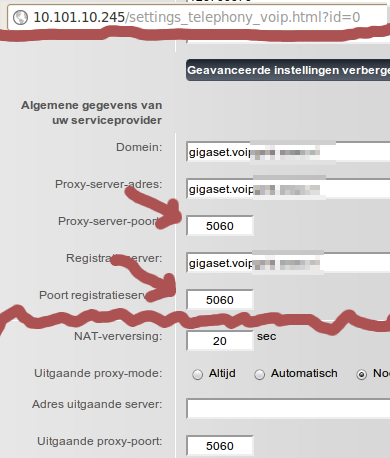
Now things work like expected. (At least with firmware 42.051 (420510000000 / V42.00).)
Suggestion to Siemens: put a notice on there that you shan't fill in the port if you want things to work properly.
Update 2013-03-21
RFC 3263 (Locating SIP Servers) 4.2 writes (in June 2002):
If the TARGET was not a numeric IP address, but a port is present in
the URI, the client performs an A or AAAA record lookup of the domain
name.
That might explain why they did what they did. But it still isn't intuitive. And it's still wrong that they query both.
2012-06-13 - thunderbird / mailing list / reply
How do you reply to a mailing list post when you do not have the mail in your INBOX? With Thunderbird it is easy enough, as long as you know how.
How it works
Mail threads are matched by comparing the In-Reply-To header
with the Message-ID.
Here's an example from an Asterisk project reviewboard mailing:
Date: Fri, 08 Jun 2012 08:08:42 -0000
Message-ID: <20120608080842.8103.32910@hotblack.digium.com>
In-Reply-To: <20120607143847.27705.11556@hotblack.digium.com>
References: <20120607143847.27705.11556@hotblack.digium.com>
Subject: Re: [asterisk-dev] [Code Review] Fix issue of unrecognized inbound
 ACK when Asterisk responds to an INVITE with a 481
Every e-mail message has a globally unique message identifier. You can
tell that a mail is a reply to another mail, by comparing the mail's In-Reply-To
to the Message-ID of the original.
In the example above, the original message has:
Message-ID: <20120607143847.27705.11556@hotblack.digium.com>
On to the problem at hand: where do I fill out that In-Reply-To in my Thunderbird e-mail client?
The solution: the command line to the rescue!
How you do it
If you wanted to reply to the message above, you'd take the message id — most mailing list web interfaces do show the message id — from that mail, and call thunderbird like this. (Make sure you replace the values where appropriate.)
$ thunderbird 'mailto:asterisk-dev@lists.example.com?In-Reply-To=<20120608080842.8103.32910@hotblack.digium.com>&Cc=yourself@example.com&Subject=Re:%20bla%20bla'
Thunderbird will pop up a Compose window with the Subject and Cc
pre-set and, most importantly, it will set the In-Reply-To and References
headers for you.
2012-06-06 - python / base85 / ascii85
So python's base64 does not have a b85decode function?
Adobe uses it the ASCII-85 encoding in PDF and PostScript files.
Here is a quick and dirty one hacked together. See the wikipedia article for the ASCII-85 (base85) specs.
Prologue; we only need sys to print a warning.
# vim: set ts=8 sw=4 sts=4 et ai:
# Example base85 decoder, Walter Doekes 2012
import sys
Split the data up into 5-character chunks; 5 characters encode 4 octets.
def _chunk(data):
    # TODO: remove white space
    idx = 0
    while len(data) > idx:
        if data[idx] in 'yz':
            next = data[idx]
            idx += 1
            if next == 'z':
                yield '!!!!!', 0 # 4xNUL
            else:
                assert False # FIXME: 4xSPACE
        else:
            next = data[idx:idx+5]
            idx += len(next)
            padding = 5 - len(next)
            if padding:
                next = next.ljust(5, 'u')
            if next >= 's8W-!':
                print >> sys.stderr, 'Garbage in input: %s' % (next,)
                return
            yield next, padding
Translate the 5 characters into a 32-bit number and then to the octets.
def _decode(chunk, padding):
    assert len(chunk) == 5
    num = (((((ord(chunk[0]) - 33)
         * 85 + ord(chunk[1]) - 33)
         * 85 + ord(chunk[2]) - 33)
         * 85 + ord(chunk[3]) - 33)
         * 85 + ord(chunk[4]) - 33)
    return ('%c%c%c%c' % (
        chr(num >> 24),
        chr((num >> 16) & 0xff),
        chr((num >> 8) & 0xff),
        chr(num & 0xff)
    ))[0:4-padding]
Putting it all together.
b85decode = (lambda x: ''.join(_decode(*i) for i in _chunk(x)))
Optional; some code to test the thing.
input = (r'9jqo^BlbD-BleB1DJ+*+F(f,q/0JhKF<GL>Cj@.4Gp$d7F!,L7@<6@)/0JD'
         r'EF<G%<+EV:2F!,O<DJ+*.@<*K0@<6L(Df-\0Ec5e;DffZ(EZee.Bl.9pF"A'
         r'GXBPCsi+DGm>@3BB/F*&OCAfu2/AKYi(DIb:@FD,*)+C]U=@3BN#EcYf8AT'
         r'D3s@q?d$AftVqCh[NqF<G:8+EV:.+Cf>-FD5W8ARlolDIal(DId<j@<?3r@'
         r":F%a+D58'ATD4$Bl@l3De:,-DJs`8ARoFb/0JMK@qB4^F!,R<AKZ&-DfTqB"
         r"G%G>uD.RTpAKYo'+CT/5+Cei#DII?(E,9)oF*2M7/c")

expected = ('Man is distinguished, not only by his reason, but by '
            'this singular passion from other animals, which is a '
            'lust of the mind, that by a perseverance of delight in '
            'the continued and indefatigable generation of knowledge, '
            'exceeds the short vehemence of any carnal pleasure.')

def format72(text):
    '''Not needed at all, but python generators are so cool, I cannot
    resist.'''
    gen = iter(text.split())
    word = gen.next()
    while True:
        yield word
        linelen = len(word)
        while True:
            word = gen.next()
            if linelen + len(word) > 71:
                yield '\n'
                break
            yield ' '
            yield word
            linelen += len(word) + 1

decoded = b85decode(input)
print ''.join(format72(decoded))
assert decoded == expected
The output should look like this:
Man is distinguished, not only by his reason, but by this singular
passion from other animals, which is a lust of the mind, that by a
perseverance of delight in the continued and indefatigable generation of
knowledge, exceeds the short vehemence of any carnal pleasure.
2012-06-04 - libreoffice / spreadsheet l10n / date format
For LibreOffice's oocalc on latest Ubuntu (libreoffice-base 1:3.5.2-2ubuntu1
to take the locale settings into account for the date types, the LC_CTYPE needs to be set.
$ LC_CTYPE=en_US.UTF-8 oocalc
This causes a date input of 31-01-2012 to not get parsed as a date.
$ LC_CTYPE=nl_NL.UTF-8 oocalc
This causes the same input of 31-01-2012 to get properly understood as the DD-MM-YYYY format.
That does not make sense. LC_CTYPE should be used for character classification,
collation and case conversion. LC_TIME contains the relevant information in
d_fmt (%d-%m-%y). Why isn't that used? Or — equally disturbing —
how is it getting the right information from the wrong collation files?
And apparently I'm not the only one having libreoffice locale issues.
2012-05-23 - appartement / groningen / starterswoning
TE KOOP! Leuk appartement voor starters of studerende kinderen. Op een groene locatie in de West-Indische buurt in Groningen, ligt een licht en goed onderhouden appartement (65 m²) op de eerste woonlaag. De woning heeft een ruim balkon en het recht van gebruik op een tuin op het westen.


Voor uitgebreide informatie, bekijk de (mobile-friendly) website: starterswoning in groen deel van Groningen
2012-05-14 - ubuntu / sip video / softphone
So, I wanted to test video support with Asterisk. That was easier said than done, because the SIP softphones that ship with Ubuntu don't all do what they promise.
This was done on a setup that works for numerous hardphones and PBXs out there. Looking through the registration list at any given time reveals at least 40+ different user agents and a large multiple of that if you take the different versions into account.
Drawbacks of Ekiga (3.2.6 and 3.3.2)
- User interface offers no advanced options.
- Refuses to run on a different local port than 5060 (or at least it used to).
- It crashes.
- Hangs during registration for no apparent reason. (Doesn't do registration at all, but does attempt to SUBSCRIBE to local users on the remote proxy a lot in the mean time.)
- Sends link-local IPv6 addresses in the
Contactheader, which my provider uses as only contact, resulting in breakage. - Re-registers immediately with an
Expires: 0(unregister) and claims that it is registered. - Doesn't use the outboundproxy for the registration attempts.
Conclusion: completely unusable for a setup that works with every hardphone out there.
Drawbacks of Telepathy/Empathy (2.30.3 and 3.4.1)
- It crashes, but less often than Ekiga.
- The user interface is unintuitive: accounts list available through
empathy-accountsbinary only; details-of-call pane is truncated so only the first 6 letters of relevant info is visible; setting up a call not possible through the notification area. - Call setup failed when the default NAT settings were enabled. Things started working when we disabled all NAT features in the client and relied on the NAT-magic of the remote OpenSIPs and Asterisk.
- Video support fails when one end does not have a video source.
- For no apparent reason, it started doing auto-pickup (with video!). That could create embarrassing situations ;-)
Conclusion: less broken than Ekiga, but still unusable.
Drawbacks of Linphone (3.2.1 and 3.3.2)
- It did manage to calculate the wrong MD5 response for an authentication request once. But since it did that when I was messing about with the hostname in /etc/hosts, I will forgive it.
- You cannot disable sending video if you have a working video source without disabling the reception of video as well.
- It works! Even when one of the clients doesn't have a video input source. Oh wait.. this isn't a drawback.
- It has a sensible (old school) user interface with settings where you expect them! Another one for the plus side.
Conclusion: use Linphone! Thank you Simon Morlat. (Now, if you could just replace the 't' in “standart” [sic] in the About box ;-) )
By the way, the video support in Asterisk did indeed work fine.
2012-05-04 - django / mark_safe / translatables
Look at this snippet of Django code in models.py, and in particular
the help_text bit:
from django.db import models
from django.utils.translation import ugettext_lazy as _
from django.utils.safestring import mark_safe

class MyModel(models.Model):
    my_field = models.CharField(max_length=123,
                                help_text=mark_safe(_('Some <b>help</b> text.')))
For those unfamiliar with Django. A quick run-down:
- The definition of
MyModelcreates a mapping between the MyModel class and a underlyingapp_mymodeltable in a database. - That table will consist of two columns:
id, an automatic integer as primary key (created by default), andmy_field, a varchar/text field of at most 123 characters. - With minimal effort a HTML form can be generated from this. That form will
show
my_fieldas a text input box and near it the text we defined inhelp_text. - The
_()-function has the gettext functions run over it so the text can be served in different languages with minimal effort. - The
mark_safe()-function tells the template rendererer that this output is already safe to use in HTML. Without it, the user would see:Some <b>help</b> text.
Unfortunately this doesn't do what you would expect.
Let's examine why.
There is a reason why we use the ugettext_lazy wrapper in models.py.
This code is executed once at startup / first run, and the language that was selected at that time
would be substituted if we used the non-lazy ugettext. The lazy variant makes
sure the substitution takes place at the last possible time.
mark_safe forces the translation to happen immediately.
In the best case that means someone else can get the help text served in the wrong language.
In the worst case, you get a recursive import when the translation routines attempt to
import all INSTALLED_APPS while looking for locale files. Your MyModel
might be referenced from one of those apps. The result: recursion and a resulting ImportError.
...
File "someapp/models.py", line 5, in <module>
    class MyModel(models.Model):
File "someapp/models.py", line 6, in <module>
    my_field = models.CharField(max_length=123,
File "django/utils/safestring.py", line 101, in mark_safe
    return SafeUnicode(s)
...
File "django/utils/translation/trans_real.py", line 180, in _fetch
    app = import_module(appname)
File "django/utils/importlib.py", line 35, in import_module
    __import__(name)
...
ImportError: cannot import name MyModel
Lessons learnt: if you're using translations then don't call mark_safe
on anything until it's view time.
In this case, we would fix it by adding the mark_safe call to the Form
constructor. We know that that is run for every form instantiation, so that's late enough.
class MyModelForm(forms.ModelForm):
    class Meta:
        model = MyModel

    def __init__(self, *args, **kwargs):
        super(MyModelForm, self).__init__(*args, **kwargs)
        self.fields['my_field'].help_text = mark_safe(self.fields['my_field'].help_text)
But suggestions for prettier solutions are welcome.
Update 2013-03-21
The Django 1.4 docs provide the better solution:
from django.utils import six  # Python 3 compatibility
from django.utils.functional import lazy
from django.utils.safestring import mark_safe
from django.utils.translation import ugettext_lazy as _

mark_safe_lazy = lazy(mark_safe, six.text_type)
2012-04-30 - ipython classic mode / precise pangolin
The Ubuntu do-release-upgrade broke my ipython classic mode.
The ipython package was upgraded, and apparently the configuration parser was changed.
In bash, I want colors to help me find the beginning and end of output — see
this bug report
for others agreeing with me that the derogatory comment about "focus should be on the output,
not on the prompt" in the skeleton .bashrc is is retared, but I diverge —
in ipython, I just want to see the nice >>> blocks that I'm used to and
no extra spaces. I.e.: classic mode.
Previously, one could set classic 1 in ~/.ipythonrc. Since the upgrade,
one should be able to fix it by editing .config/ipython/profile_default/ipython_config.py.
However, the fixes that the pages on google propose, do not work:
c.TerminalIPythonApp.classic = True
The following does work:
# Force classic mode!
c = get_config()
c.InteractiveShell.cache_size = 0
c.PlainTextFormatter.pprint = False
c.PromptManager.in_template = '>>> '
c.PromptManager.in2_template = '... '
c.PromptManager.out_template = ''
c.InteractiveShell.separate_in = ''
c.InteractiveShell.separate_out = ''
c.InteractiveShell.separate_out2 = ''
c.InteractiveShell.colors = 'NoColor'
c.InteractiveShell.xmode = 'Plain'
#
c.InteractiveShell.confirm_exit = False
#c.IPythonTerminalApp.display_banner = False
These settings are taken from the source where the --classic option
is defined, so they should be ok.
Update 2012-06-07
If your django shell does not show the right classic settings,
you're probably running an old version.
Here, in the 1.3 branch and higher, the code looks like this:
    def ipython(self):
        try:
            from IPython import embed
            embed()
Previously that was this, and that doesn't work, unless you pass default config to TerminalInteractiveShell
from IPython.frontend.terminal.ipapp.load_default_config:
    def ipython(self):
        try:
            from IPython.frontend.terminal.embed import TerminalInteractiveShell
            shell = TerminalInteractiveShell()
            shell.mainloop()
Just upgrade your django and be done.
2012-04-12 - safe_asterisk / init.d
An init.d script to stop and start safe_asterisk started asterisk.
If asterisk is not stopped in 5 seconds, it is forcibly killed.
# wget http://wjd.nu/files/2012/04/safe_asterisk-init.d -O/etc/init.d/asterisk ; chmod 755 /etc/init.d/asterisk
Also possibly useful, the changes I made to safe_asterisk on a
machine where:
- there wasn't a
ttyleft to spam output on, rootis configured in/etc/aliasesto a sane destination,/var/spool/asteriskis the asterisk user homedir anyway, and,- attempting to set maxfiles to the highest value possible, wasn't allowed.
#TTY=9
CONSOLE=no
NOTIFY=root
DUMPDROP=/var/spool/asterisk
MAXFILES=12288
...
run_asterisk >/dev/null 2>&1 &
2012-03-29 - sip / digest calculation
Every one in a while, I see an unexpected 403 response to a SIP
client's REGISTER request. Thusfar the digest
response calculation has never been wrong, but it feels good to
get that check out of the way and move on to other possible
causes.
For your enjoyment and mine, a Bourne-shell compatible shell
script that calculates (qop-less)
Digest authentication
responses.
Download: hahacalc.sh (view)
$ hahacalc
Usage:   hahacalc.sh USERNAME REALM METHOD DIGESTURI NONCE [PASSWORD] [COMPARE]
Or:      hahacalc.sh METHOD < autorization_headers
Example: hahacalc.sh 123456789 itsp.com REGISTER sip:sip.itsp.com:6060 \
           4f7406a80000c2f214774a48d11cc5b 9e533caff7a05904c MYPASSWORD \
           f5787ba2624dfdbcf874f46425d65b53
Or:      echo 'Authorization:...' | hahacalc.sh REGISTER
$ hahacalc 123456789 itsp.com REGISTER sip:sip.itsp.com:6060 4f7406a80000c2f214774a48d11cc5b9e533caff7a05904c MYPASSWORD f5787ba2624dfdbcf874f46425d65b53
A1   = 123456789:itsp.com:MYPASSWORD
HA1  = 7f3c958e155df4070204c2aa5293437f
A2   = REGISTER:sip:sip.itsp.com:6060
HA2  = 2d13f8e4f7343dbd44be6ddabf8c2c1d
RESP = f5787ba2624dfdbcf874f46425d65b53
Update 2013-06-19
Updated hahacalc to be able to parse Authorization:
headers too. In that mode of operation, you pass only METHOD as argument,
you enter the password on the console, and you input the SIP body through stdin.
2012-03-13 - python virtualenv / global site-packages
If you're switching from Ubuntu Oneiric to Ubuntu Precise
and you're using python-virtualenv, you might be in for a
surprise:
The default access to the global site-packages modules is reversed between virtualenv 1.6.x and 1.7.
When you were used to finding your apt-get installed python
modules like python-mysqldb and python-psycopg2 in your
new virtualenv environment, now they're suddenly unavailable.
The culprit:
       --no-site-packages
           Ignored (the default).  Don´t give access to the global
           site-packages modules to the virtual environment.
That was not the default before.
The new option to get the old behaviour:
       --system-site-packages
           Give access to the global site-packages modules to the
           virtual environment.
By the way, if you already populated your new virtualenv directory
with the 1.7 version, you don't need to recreate it.
Removing the no-global-site-packages.txt is enough:
# find /srv/django-env -name no-global-site-packages.txt
/srv/django-env/mysite/lib/python2.7/no-global-site-packages.txt
2012-02-27 - mysql / replicating repair table
From the MySQL 5.1 manual:
15.4.1.16. Replication and REPAIR TABLE
When used on a corrupted or otherwise damaged table, it is possible for the REPAIR TABLE statement to delete rows that cannot be recovered. However, any such modifications of table data performed by this statement are not replicated, which can cause master and slave to lose synchronization. For this reason, in the event that a table on the master becomes damaged and you use REPAIR TABLE to repair it, you should first stop replication (if it is still running) before using REPAIR TABLE, then afterward compare the master's and slave's copies of the table and be prepared to correct any discrepancies manually, before restarting replication.
Sounds like a pain the behind to have to do manually, especially if you have data updates in one of the two Master-Master replicated machines.
But that is not the point with my quote. The point is:
If REPAIR TABLE does nothing to ensure that two copies are identical, then
why on earth does it replicate the REPAIR TABLE statement at all?
Because that was all I wanted to know: does REPAIR TABLE get replicated?
Logical answer: no
Actual answer: yes
Beware.. and be prepared to skip a couple of statements.
2012-02-17 - indirect scp / bypass remote firewall rules
Suppose I'm on machine DESKTOP and I want to copy files from server APPLE to server BANANA. DESKTOP has access to both, but firewalls and/or missing ssh keys prevent direct access between APPLE and BANANA.
Regular scp(1) will now fail. It will attempt to do a direct copy
and then give up. This is where this
indirect scp wrapper
(view) comes in:
- First, it tries to do the direct copy.
- If that fails, it uses the local machine as an intermediary.
In this example you'll see it fail twice for the two source files and then fall back to using the local machine.
$ scp -r APPLE:example/file1 APPLE:example/somedir BANANA:some_existing_path/
Host key verification failed.
lost connection
Host key verification failed.
lost connection
(falling back to indirect copy...)
file1                                     100%    6     0.0KB/s   00:00
here                                      100%    5     0.0KB/s   00:00
two_files                                 100%   10     0.0KB/s   00:00
(copy from here to destination...)
file1                                     100%    6     0.0KB/s   00:00
here                                      100%    5     0.0KB/s   00:00
two_files                                 100%   10     0.0KB/s   00:00
(cleaning up temporary files...)
For a bit of added security, it uses shred(1) to clean up
the local files, if available.
Installation:
# cd /usr/local/bin
# wget http://wjd.nu/files/2012/02/indirect-scp.sh -O indirect-scp
# chmod 755 indirect-scp
# ln -s indirect-scp scp
If you know the direct copy will fail, you can call indirect-scp
directly.
2012-01-25 - mysql replication / relay log pos
So, hardware trouble caused a VPS to go down. This VPS was running a MySQL server in a slave setup. Not surprisingly, the unclean shutdown broke succesful slaving.
There are several possibly causes for slave setup breakage. This time it
was the local relay log file (mysqld-relay-bin.xxxx)
that was out of sync.
SHOW SLAVE STATUS\G looked like this:
...
       Master_Log_File: mysql-bin.001814  <-- remote/master file (IO thread)
   Read_Master_Log_Pos: 33453535          <-- remote/master pos  (IO thread)
        Relay_Log_File: mysqld-relay-bin.001383  <-- local/slave file (SQL thread)
         Relay_Log_Pos: 34918332                 <-- local/slave pos  (SQL thread)
 Relay_Master_Log_File: mysql-bin.001812  <-- remote/master file (SQL thread)
...
            Last_Errno: 1594
            Last_Error: Relay log read failure: Could not parse relay log event entry. The possible reasons are: the master's binary log is corrupted (you can check this by running 'mysqlbinlog' on the binary log), the slave's relay log is corrupted (you can check this by running 'mysqlbinlog' on the relay log), a network problem, or a bug in the master's or slave's MySQL code. If you want to check the master's binary log or slave's relay log, you will be able to know their names by issuing 'SHOW SLAVE STATUS' on this slave.
...
   Exec_Master_Log_Pos: 34918187          <-- remote/master pos  (SQL thread)
...
Step one was to find out where we were in the local and on the remote
end. Luckily, most queries ran during the failure period were UPDATEs
on the same table.
- Remote position was ok. On the master,
/var/log/mysql/mysql-bin.001812contained these lines:# at 34918187 #120125 1:16:05 server id 1 end_log_pos 34918531 ... SET TIMESTAMP=1327450565/*!*/; UPDATE mytable ....
- The statements before that had been ran on the slave and this statement hadn't.
- On the slave,
/var/lib/mysql/mysqld-relay-bin.001383did contain the previous line, but did not contain position 34918332. - Looking further, I could see that
mysqld-relay-bin.001384was practically empty, butmysqld-relay-bin.001385contained already executed statements, and after a bit of browsing there it was too:# at 21491 #120125 1:16:05 server id 1 end_log_pos 34918531 ... SET TIMESTAMP=1327450565/*!*/; UPDATE mytable ...
Good. So we need only move the relay log file pointer a bit to the front.
mysql> CHANGE MASTER TO RELAY_LOG_FILE='mysqld-relay-bin.001385', RELAY_LOG_POS=21491;
ERROR 1380 (HY000): Failed initializing relay log position: Could not find target log during relay log initialization
What? Searching for that error pointed to a document about copying slave data to another slave and about modifying files. Hmm.. modifying files. I can do that too...
# cat /var/lib/mysql/relay-log.info
./mysqld-relay-bin.001383
34918332
mysql-bin.001812
34918187
0
With a little speed — /etc/init.d/mysql stop ; vim /var/lib/mysql/relay-log.info ; /etc/init.d/mysql start —
I edited the relay log file and relay log position in relay-log.info by hand.
Voilà! It worked. Slave replication was running again like it should.
2012-01-08 - mencoder / canon / mjpeg
I tend to make few movies with my digital photo camera because they take up so much space. That's a shame, because having a bit of moving image is fun to look at when the kids have grown up.
The reason they take up so much space is simple. The camera is not equipped with fancy encoding algorithms: the video is stored as MJPEG, basically a series of JPEG images joined together. Somehow I should've known this ;-)
==========================================================================
Opening video decoder: [ffmpeg] FFmpeg's libavcodec codec family
Selected video codec: [ffmjpeg] vfm: ffmpeg (FFmpeg MJPEG)
==========================================================================
Opening audio decoder: [pcm] Uncompressed PCM audio decoder
AUDIO: 11024 Hz, 1 ch, u8, 88.2 kbit/100.00% (ratio: 11024->11024)
Selected audio codec: [pcm] afm: pcm (Uncompressed PCM)
==========================================================================
...
AO: [pulse] 11024Hz 1ch u8 (1 bytes per sample)
...
VO: [xv] 640x480 => 640x480 Packed YUY2
The audio is already stored in low quality (low sample rate, mono, low precision), but the video encoding can be improved vastly.
$ mencoder -oac copy -ovc x264 -o ${input%.avi}-h264.avi $input
... or, if you need it rotated clockwise:
$ mencoder -oac copy -ovc x264 -vf rotate=1 -o ${input%.avi}-h264.avi $input
This decreased my samples files by 9.5x on average. 32MiB is still way too big for a low quality 2.5 minute video clip, but it's a lot better than 280MiB.
Update 2013-07-13
Sample script to aid in conversion of multiple files:
mjpegtoh264.sh
(view)


